Modules are the way that you can hide or show different features of the mobile and web app experience for different users. Our module system is unique in that you are able to mix and match modules to fit your use case for any user. The list below describes what each module does.
Please note that modules only allow users to take actions with regard to locations they have access to. The only exception is the "Manage Account" module, which gives broad account privileges and gives the user access to ALL LOCATIONS.
Administrative
Tables can't be imported directly. Please insert an image of your table which can be found here.
Dashboards > Action BoardDashboards > Check In Map.Dashboards > Trends- Act as an administrator for the Clean Smarts account.
- Change company settings.
- See all users and locations associated with your company's Clean Smarts account regardless of your location access.
- Remove messages from message chats
Users
Tables can't be imported directly. Please insert an image of your table which can be found here.
Admin > Manage UsersUsersAdmin > Manage Users UsersLocations
Tables can't be imported directly. Please insert an image of your table which can be found here.
- Access Manage Locations
- Edit location information.
- Add supplies to locations.
- Add checklists to locations.
Allow users to clock into locations they have access to even if they are not scheduled for shifts at those locations.
In the v2 App, this module will show the check-in button when the user taps on a location from the List or Map views. Without this module, there is no check-in button when viewing location details from the List or Map view.
On the Legacy App, this module will enable the Locations screen. Without this module, the Locations screen is not visible, so the user cannot view the location in order to clock in.
Scheduling
Tables can't be imported directly. Please insert an image of your table which can be found here.
Manage JobsJobsManage JobsJobsMy JobsLocationsMy Jobs LocationsTime Tracking > Health and Attendance SurveysTimesheets
Tables can't be imported directly. Please insert an image of your table which can be found here.
- View the out-of-bounds check-in report.
- Receive notifications if somone checks in or out while outside a geofence.
- Clock in and clock out from the mobile app.
- Receive late notifications for yourself.
- Access Time Tracking reports:
- Approve hours
- View time detail
- Modification log
- Budget-to-actual
- Schedule status
- No-shows and late check-ins
- Open check-ins
- Short shifts
- Check-in attempts
- Out-of-bounds check-ins
- Create, modify, delete, and approve other users' time.
- Receive late and no-show check-in notifications.
- Access all of the same Time Tracking reports that the Timetracking (Edit) module can access, but with view-only capability only.
- Access Time Tracking reports and approve hours:
- Approve hours
- View time detail
Checklists
Tables can't be imported directly. Please insert an image of your table which can be found here.
- Access Manage Checklists
- Create, edit, and remove checklist and task information.
- Add checklists to locations.
Inspections
Tables can't be imported directly. Please insert an image of your table which can be found here.
- View completed inspections.
- View overdue inspections.
- View inspection information in Dashboard Trends.
Issues
Tables can't be imported directly. Please insert an image of your table which can be found here.
- Create and edit issues (internally reported and customer-reported).
- Make internally reported issue visible to customers.
- Create, edit and assign issues (internally reported and customer-reported).
- Make internally reported issue visible to customers.
Supplies
Tables can't be imported directly. Please insert an image of your table which can be found here.
- Access Manage Supplies
- Access Manage Suppliers
- Add, edit, and remove supplies
- Modify and close supply requests.
- View Cost and Levels report
- Create supply requests
- Close and fulfill supply requests
- Set supply quantities at a location.
- Allows user to see supply costs
- Create supply requests
- Close and fulfill supply requests
- Without the Supplies (Edit) module, user will not see cost
Messaging
Tables can't be imported directly. Please insert an image of your table which can be found here.
Message Centercompany (internal)Messagescompany (internal)- Access Message Center and send and receive messages in company (internal) and custom group chats.
- Forward internal location-based chats to the customer chat (if user also has Messaging (Customer) module).
Services
Tables can't be imported directly. Please insert an image of your table which can be found here.
Manage ServicesAssets (Expert Tier Only)
Tables can't be imported directly. Please insert an image of your table which can be found here.
Asset RegisterAssets Asset RegisterAssetsTraining Media (Expert Tier Only)
Tables can't be imported directly. Please insert an image of your table which can be found here.
Default User Roles and Modules
Clean Smarts offers a flexible approach to managing user access on the web app. Administrators can create tailored user roles within Company Settings and assign them via the Manage Users screen. For a quicker setup, the app also provides pre-configured roles—Administrator, Manager/Inspector, Cleaner, and Customer—that come with standard module access based on typical industry norms, directly on the user profile.
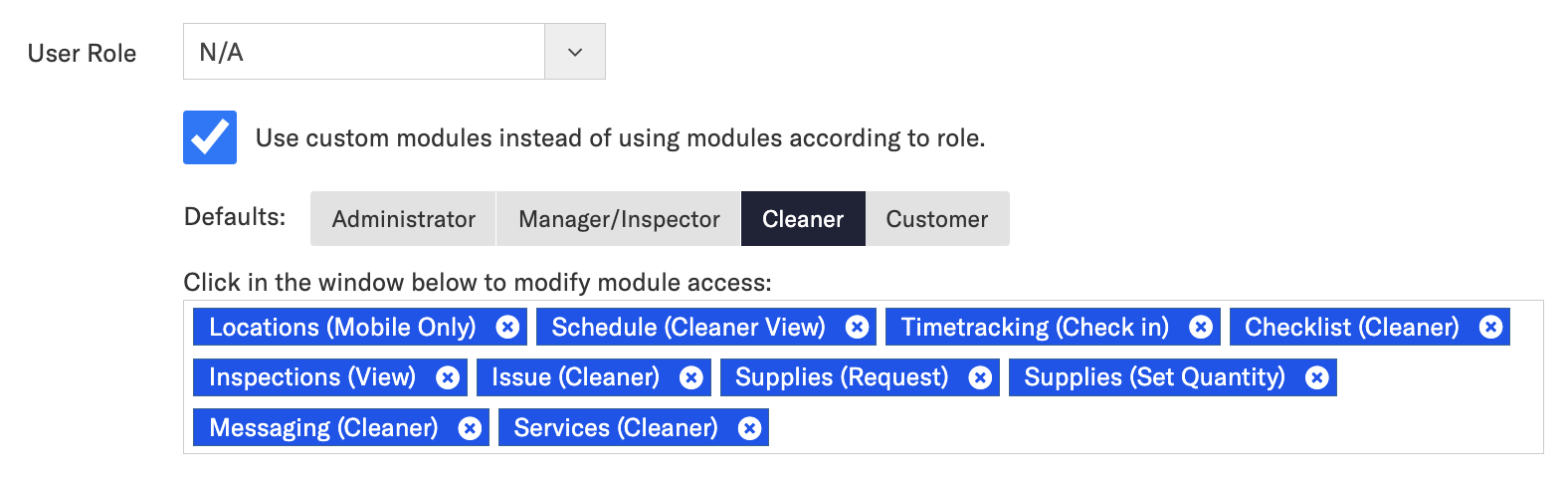
Selecting one of these default roles will automatically allocate the appropriate modules. Even better, this setup is fully customizable! You can adjust it by adding or removing modules as needed, then click 'Save' to apply your changes.